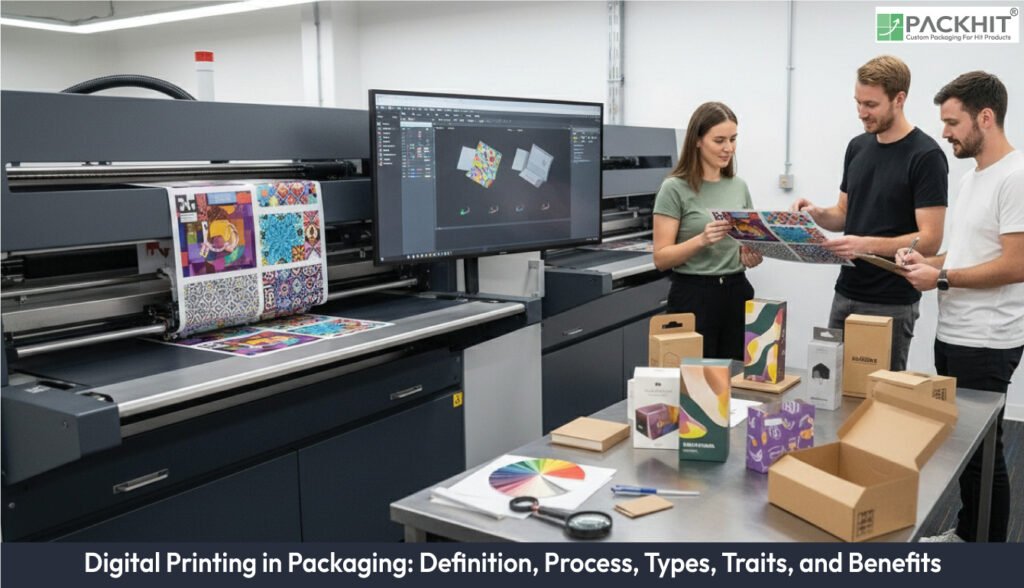
Digital printing in packaging transfers CMYK-converted digital artwork directly to substrates without plates, so brands handle low to mid volumes, on-demand work, and repeat jobs with stored files while cutting lead time and setup effort. In packaging workflows, teams first prepare and preflight JPEG or PDF files, manage colour and variable data, then send them through RIP and press software for direct transfer, before depositing ink or toner via inkjet, toner-based or UV systems, and finally move sheets or webs through coating, lamination, cutting, gluing, and inspection lines. They choose among inkjet, toner and liquid electrophotography, and direct-to-substrate UV methods for labels, cartons, corrugated and specialty packs, while using dye-sublimation, direct-to-garment, or 3D printing mainly for niche or prototyping work, based on substrate, ink performance, and run length.
Press performance in packaging depends on colour accuracy, resolution, substrate range, drying or curing behaviour, run-length economics, and data handling, which together control visual fidelity, throughput, and repeatability. Brands gain cost-effective short runs, personalisation and serialisation via variable data printing, fast turnaround, high-quality imagery, and lower setup waste, and apply these advantages to labels, folding cartons, corrugated displays, flexible pouches, prototypes, and personalised promotional packs.
- What is Digital Printing?
- Why Does Digital Printing Matter for Packaging?
- How Does the Digital Printing Process Operate for Packaging?
- Which Types of Digital Printing are Used in Packaging?
- Inkjet printing
- Toner-based and liquid electrophotography (LEP)
- Direct-to-substrate and UV-curable printing
- Other digital methods
- What Specifications and Performance Traits Define Digital Printing for Packaging?
- Colour accuracy
- Image resolution
- Substrate range
- Drying behaviour
- Run‑length efficiency
- Data‑handling capacity
- What are the Principal Benefits of Digital Printing in Packaging?
- Cost-effectiveness for short production runs
- Customisation and personalisation
- Faster turnaround and simpler setup
- High-quality output and design fidelity
- Sustainability and reduced material use
- Where is Digital Printing Used within Packaging?
- How Does Digital Printing Compare with Offset Printing?
- How Should Design Files Be Prepared for Digital Packaging Presses?
- What Operational Factors Limit Digital Printing in Packaging Production?
- How Does Digital Printing Support Supply Chain and Marketing Tasks?
What is Digital Printing?
Digital printing is a class of print processes that transfers raster or vector digital image data directly to a substrate without intermediary plates. It replaces film-and-plate pre-press by performing pre-press tasks on computers, applying a CMYK transformation to digital artwork and using press-side software to link files to printing hardware. As a printing process, it is distinguished from offset primarily by its suitability for low-to-mid volume production and on-demand jobs; contemporary deployments use multiple methods (inkjet, toner-based, dye-sublimation, UV), accept common input formats (JPEG, PDF) and store pre-press data for exact duplicate runs when required.
Why Does Digital Printing Matter for Packaging?
Digital printing matters because it lowers lead time and unit cost for short and variable runs, permits per-item uniqueness and reduces inventory by making repeat production immediate from stored files. For packaging, the practical outcomes include affordable prototypes and samples, increased SKU variety through variable data printing (VDP), enhanced traceability and security via unique identifiers and shorter time-to-market for seasonal or promotional designs. Digitally driven workflows also shift manual pre-press tasks onto software, which tightens the link between design iterations and the press, reducing opportunities for setup errors and accelerating campaign execution.
How Does the Digital Printing Process Operate for Packaging?
The packaging printing process using digital technology comprises four discrete stages: file preparation, direct transfer to the press, printing and post-processing.
1. File preparation
File preparation converts design assets into print-ready digital files and applies colour management; it commonly uses JPEG or PDF input files, which the pre-press system converts to CMYK for press output. During this stage, artwork is preflighted for resolution, colour profile and bleed, variable-data templates are mapped where required, and the final files are stored on digital media or servers to permit exact duplicates on demand and to support on-demand reorders.
2. Direct transfer to the printer
Direct transfer is the transmission of the prepared digital file to the press via raster image processor (RIP) and press-control software, eliminating plate-making and analogue transfer steps. Modern solutions (for example, liquid electrophotography and thermal or piezoelectric inkjet platforms) use software to convert image data into printer head instructions or electrostatic transfer sequences, which shortens setup time and permits immediate press start-up from a single digital asset.
3. Printing
Printing deposits ink or toner onto the substrate using the selected digital method; inkjet propels droplet volumes, toner-based systems use electrostatic transfer and fusion, and UV systems cure inks in place with ultraviolet radiation. Digital inks typically have short drying or curing times, deliver high image resolution and accurate reproduction of gradients and complex artwork, and produce outputs with good adhesion and fade resistance on substrates such as paper, board and flexible films.
4. Post-processing
Post-processing covers finishing operations applied after digital image transfer, for example, coating, lamination, cutting and gluing, and quality inspection. Digital printing integrates with conventional finishing lines and with automated slitting, die-cutting and folding equipment so that a digitally produced panel can progress to final assembly with minimal additional set-up.
Which Types of Digital Printing are Used in Packaging?
Packaging production typically uses several digital approaches; the most common are inkjet, toner-based electrophotography (including liquid electrophotography) and direct-to-substrate UV printing; other approaches, such as dye-sublimation, direct-to-garment and 3D printing, apply in specialised contexts.
Inkjet printing
Inkjet printing propels discrete droplets of ink from printheads to the substrate and is used across labels, folding cartons and some flexible packaging applications. It reproduces fine detail and continuous-tone gradients because variable drop sizes and precise placement control permit high-resolution output. Ink choices include aqueous pigment, pigment-based UV-curable and latex chemistries that determine adhesion, durability and drying characteristics.
Toner-based and liquid electrophotography (LEP)
Toner-based systems transfer toner electrostatically and fuse or transfer liquid toner to substrates, providing stable colour and high throughput for medium-volume folding cartons and label production. LEP performs the transfer from a photoconductor to substrate with liquid toner, giving consistent halftone quality and good print durability across coated and uncoated papers.
Direct-to-substrate and UV-curable printing
Direct-to-substrate presses deposit cured inks straight onto rigid or flexible materials without intermediary media. They commonly use UV-curable chemistries which harden instantly under UV LED and so support non-absorbent substrates such as certain plastics, metal and glass. This approach is applied to corrugated boards, rigid displays and speciality packaging where surface adhesion and immediate post-print handling are required.
Other digital methods
Dye-sublimation is used primarily for textiles and graphic wraps rather than primary food packaging. Direct-to-garment and 3D printing serve niche prototyping, short-run decorative packaging and mock-ups. Selection among methods is driven by substrate, ink/performance requirements and run length.
What Specifications and Performance Traits Define Digital Printing for Packaging?
Digital packaging presses are defined by measurable traits such as colour accuracy, resolution, substrate range, drying behaviour, run‑length efficiency, and data-handling capacity, each of which shapes output stability, production timing, and repeatability.
Colour accuracy
Colour accuracy is the primary control point. Presses use CMYK conversion, ICC profiles (International Color Consortium profiles) and calibrated ink curves to keep hue and density stable across repeat batches. This matters for FMCG packaging where brand colours appear across cartons, labels and corrugated displays.
Image resolution
Image resolution determines clarity and tonal smoothness. Inkjet nozzles and electrophotographic toner units place dots at controlled intervals, which produce readable micro‑text and continuous gradients. Packaging with photographic panels or small regulatory icons depends on this resolution.
Substrate range
Substrate range refers to the materials that accept digital inks. Presses run coated paper, uncoated board, synthetic films and textured stocks, if ink chemistry matches surface energy. UV‑curable inkjet expands the range to plastics and metal, as seen in direct‑to‑substrate packaging lines.
Drying behaviour
Drying behaviour affects sheet handling and finishing speed. Aqueous pigment dries through absorption; toner fuses with heat; UV‑curable inks set under LED lamps. These modes change how quickly sheets move to coating, lamination or die‑cutting without smearing.
Run‑length efficiency
Run‑length efficiency describes how cost and throughput change with quantity. Digital presses avoid plate costs, so short and mid‑volume runs maintain a stable unit price. Large runs still shift to offset, where plate amortisation spreads fixed cost across tens of thousands of sheets.
Data‑handling capacity
Data‑handling capacity controls variable data throughput. RIP processors interpret JPEG and PDF files, convert colour spaces and queue large data loads such as personalised fields, serialisation sequences or multi‑SKU campaigns. Performance affects how fast a press clears complex variable jobs.
What are the Principal Benefits of Digital Printing in Packaging?
Digital printing produces lower total cost for small batches, rapid turnaround, strong customisation capabilities, and high-fidelity output while reducing waste and the need for upfront tooling.
Cost-effectiveness for short production runs
Digital printing cuts unit cost on short production runs because the process removes plate and die charges. This reduction lowers the break-even point for batches that sit below medium volumes. The absence of tooling also trims set-up scrap, which reduces material loss on each restart. Test‑market packs, limited runs and seasonal variants use this cost pattern, if artwork shifts often or volumes change without warning.
Customisation and personalisation
Digital presses print variable data on each unit. Variable data printing assigns unique identifiers, serial numbers, QR codes or short personalised fields to every pack without stopping the press. The process keeps each data field linked to the original CMYK‑converted file, since the RIP reads the source PDF or JPEG and queues item‑by‑item changes. This supports product traceability, targeted promotions and SKU‑level differentiation for UK manufacturers, if batches shift often or if packs require fast regional updates.
Faster turnaround and simpler setup
Digital workflows cut analogue makeready because presses read JPEG or PDF files directly. Permanent file storage keeps past jobs ready for repeat runs. Short setup steps push artwork from approval to print with fewer checks and fewer substrate tests.
High-quality output and design fidelity
Advanced printheads and toner systems reproduce gradients, fine type and photographic imagery with high resolution and consistent colour, supporting premium packaging aesthetics.
Sustainability and reduced material use
Digital printing reduces waste from set-up, eliminates plate manufacture and supports lower ink consumption for small runs; eco-friendly ink chemistries and improved deinkability can reduce the carbon and waste footprint of packaging production.
Where is Digital Printing Used within Packaging?
Digital printing is used for labels, folding cartons, corrugated packaging, flexible pouches, shrink sleeves, prototypes, limited editions and personalised packaging, among other applications.
- Labels: Short runs, personalisation and frequent SKU changes make digital label presses attractive for consumer goods and logistics labels.
- Folding cartons: Prototypes, limited editions and regional variations are common use cases where digital reduces setup time and cost.
- Corrugated packaging: Display-ready corrugated boxes and short-run shipping cartons are produced digitally for rapid fulfilment and retail-ready graphics.
- Flexible packaging: Small-batch pouches and speciality film runs benefit from the ability to print variable artwork without plate tooling, where substrate and barrier considerations are met.
- Prototypes and samples: Digital printing makes functional prototypes affordable and repeatable from stored files, accelerating design validation.
- Personalised promotional packaging: Campaigns that require individual names, unique codes or segmented artwork exploit variable data functionality.
How Does Digital Printing Compare with Offset Printing?
Digital printing and offset printing differ in quality, speed, cost and colour matching. The key differences between digital printing and offset printing are given below:
- Quality: Digital engines place toner particles or inkjet droplets near the sheet surface and form images that shift with droplet volume, particle size or fusing pressure, while offset presses form plate‑based halftone dots that stabilise after ink‑water balance settles.
- Speed: Digital presses reach print‑ready status within minutes because RIP data drives imaging directly, whereas offset presses run faster on long jobs after plate mounting, wash‑up and ink‑key alignment are complete.
- Cost Efficiency: Digital printing fixes a stable unit cost because consumable use scales with coverage, while offset printing lowers cost on long runs because plate and makeready charges spread across thousands of sheets.
- Colour Matching: Digital engines map image values to CMYK or CMYK+OGV gamuts and shift Delta E colour difference metric (ΔE) values when heads drift or consumables change, while offset presses maintain the Delta E colour difference metric (ΔE) values under 2 with spectrophotometric checks and direct ink films.
How Should Design Files Be Prepared for Digital Packaging Presses?
Files should be delivered as print-ready JPEG or PDF with colours managed to an agreed CMYK profile and with sufficient image resolution for the intended print size; preflight should confirm bleed, trim, embedded fonts and variable-data mappings if used.
Practical preparation steps include:
- Convert or proof artwork in the target CMYK profile and supply a digital proof that simulates press output.
- Embed or outline fonts, flatten transparency where required and include trim/bleed guides for finishing.
- Provide high-resolution raster imagery at final print size and supply vector elements for sharp type and logos.
- Where variable data printing is used, supply a validated data file and template mapping that specifies per-item fields (for example, unique codes, serial numbers, barcodes).
What Operational Factors Limit Digital Printing in Packaging Production?
Digital printing simplifies packaging workflows, yet its limits arise from material behaviour, ink chemistry and run‑length economics, because each factor changes print stability, colour accuracy and finishing speed. Offset or gravure maintain lower marginal cost on very large batches due to plate amortisation and continuous‑run efficiency.
Points to consider when specifying digital packaging production:
- Substrate and ink matching: Match ink chemistry to substrate absorption or surface energy, for example, UV‑curable pigments for non‑absorbent films or aqueous pigment for paper; confirm compliance with food‑contact standards where barrier requirements appear.
- Finishing integration: Align coating, lamination and die‑cutting with the ink‑drying mode; UV‑cured inks harden instantly, while aqueous pigment may mark if sheets reach cutters before full absorption.
- Colour consistency: Maintain ICC profiles and calibrated CMYK curves across presses; RGB sources or Pantone spot references can shift if conversion settings differ between jobs.
- Cost planning: Use break‑even calculations to distinguish short digital runs from long analogue runs. Digital retains stable unit cost at low volumes, if artwork changes often or if multiple variants run in sequence.
- Quality control: Test adhesion, rub resistance and fade behaviour on representative substrates. Toner fusion and UV‑cured inks resist abrasion more than some aqueous systems, although chemical exposure varies by finish.
How Does Digital Printing Support Supply Chain and Marketing Tasks?
Digital printing supports rapid response to market demand, reduces inventory through on-demand replenishment and allows targeted, personalised promotions that match segmented marketing strategies. Stored digital assets permit immediate reorders with exact duplication of artwork, which shortens lead times for regionalised packaging, promotional runs and test-market launches. Variable data functions add traceability features that integrate with logistics and anti-counterfeit systems, supporting product security and post-sale analytics.