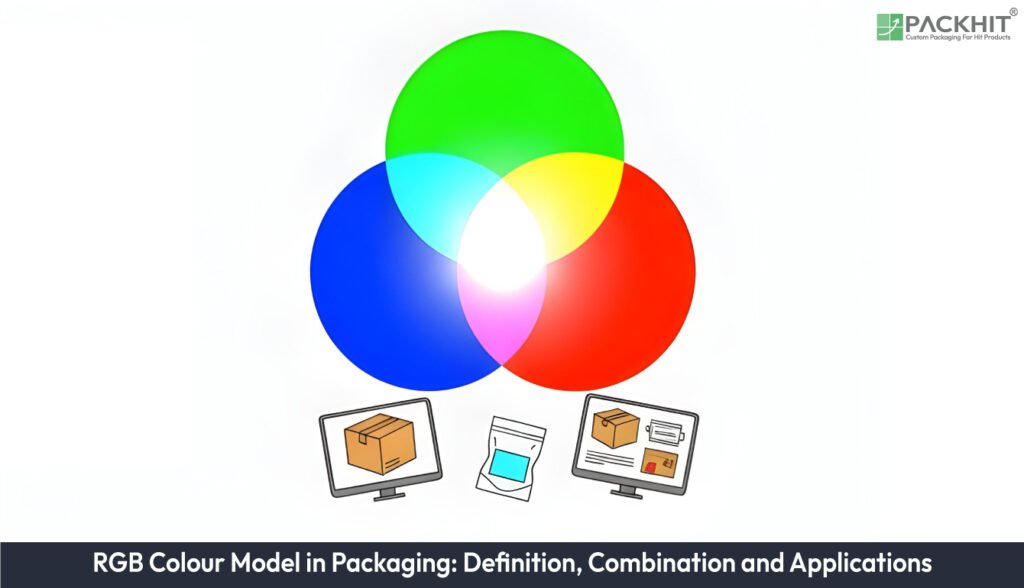
The RGB (Red, Green and Blue) colour model underpins all screen-based work in packaging because it represents colour through additive red, green and blue light values that designers use to build digital mock-ups, e-commerce imagery and on-screen proofs. RGB channel combinations create millions of colours that help teams test brightness, contrast and hue during concept development before converting artwork to CMYK for print. These light-based values support pixel-level checks, Python scripting workflows and early visual decisions, even though their appearance shifts when translated into ink. Understanding how RGB mixes colours, where it applies, how it converts and where its limitations appear helps packaging teams manage colour accuracy across digital displays and printed packaging.
- What is RGB Colour Model in Packaging?
- How Does RGB Make Different Colour Combinations?
- What are the Applications of the RGB colour model in Printing and Packaging?
- What is the Role of RGB in Packaging Design?
- How to Convert an RGB File to a CMYK File?
- What are the Potential Drawbacks of Using the RGB Colour Model for Packaging?
What is RGB Colour Model in Packaging?
The RGB colour model in packaging represents colour as a triplet of red, green and blue light intensities that combine additively to form a defined output colour. The model employs light-based mixing, where increased channel values increase brightness, and all three channels at maximum create white. Examples appear in simple tuples such as (255, 0, 0) for red, (0, 255, 0) for green and (0, 0, 255) for blue; mixed values like (0, 255, 255) create cyan, and (128, 128, 128) create mid‑grey. Each channel carries 256 levels in common workflows, giving 16,777,216 combinations. Developers test these values directly in scripts with the help of Python code that assigns integer intensities to pixels during digital mock‑up previews. This structure supports packaging design because emitted‑light previews show how artwork appears on screens before any print conversion.
How Does RGB Make Different Colour Combinations?
RGB makes different colour combinations by adding light from the red, green and blue channels and varying each channel’s intensity to form a single output colour.
- Red Combinations
- Green Combinations
- Blue Combinations
- Full‑channel Combinations
Red Combinations
Red combinations form colours when red values rise, and green or blue values shift in defined amounts; red plus green builds yellows at moderate levels and red plus blue forms magentas that appear in digital packaging mock‑ups.
Green Combinations
Green combinations appear when the green channel increases while red or blue adjusts; green plus blue forms cyans used in secondary display colours, and green plus red forms warm tones seen during concept stages for packaging layouts.
Blue Combinations
Blue combinations emerge when blue intensities rise against red or green changes; blue plus red produces magentas used in digital accent, and blue plus green produces cyans shown during on‑screen artwork reviews.
Full‑channel Combinations
Full‑channel combinations occur when all three channels rise together; equal high values create white on screens used for packaging previews, and equal mid‑range values create greys applied in calibration charts during soft‑proof checks.
The examples of RGB colour in the table below illustrate how defined channel values map to practical digital tasks in packaging workflows.
| Colour name | RGB tuple (R, G, B) | Practical use |
|---|---|---|
| Pure red | (255, 0, 0) | Brand accents in digital mock‑ups |
| Pure green | (0, 255, 0) | Interface highlights and product images |
| Pure blue | (0, 0, 255) | Backgrounds and web banners |
| Cyan | (0, 255, 255) | Display examples of secondary colours |
| Mid‑grey | (128, 128, 128) | Neutral backgrounds and exposure checks |
These values show how single‑channel peaks, dual‑channel blends and balanced mid‑tones behave on emissive devices. The tuples act as reference points in digital packaging reviews, and Python workflows test them by assigning each value set directly to display pixels during preliminary checks.
What are the Applications of the RGB colour model in Printing and Packaging?
The applications of the RGB colour model in printing and packaging are all screen‑based tasks that rely on emitted‑light previews, digital artwork checks and pixel‑level tests during early design stages.
Digital Mock‑ups
Digital mock‑ups use RGB channel values to display brightness and hue changes during early packaging checks.
E‑commerce Imagery
E‑commerce imagery uses RGB representations to keep colour behaviour consistent across retail product pages.
On‑screen Proofing
On‑screen proofing uses RGB previews to test colour balance before any conversion to print separations.
Pixel Testing in Python
Pixel testing in Python uses direct integer assignments for each RGB channel when designers check gradients or saturation limits.
What is the Role of RGB in Packaging Design?
The role of RGB in packaging design is to provide accurate on‑screen colour behaviour during concept, review and digital‑only asset creation. RGB acts as the working space for screens that emit light, and this direct match between channel intensity and display output lets designers check brightness, contrast and hue before any print conversion. RGB previews also frame early layout decisions because every adjustment to red, green or blue values updates instantly on monitors, tablets and phones used in stakeholder reviews. RGB sets visual expectations during the planning phase, even if downstream work shifts to CMYK for print.
How to Convert an RGB File to a CMYK File?
To convert an RGB file into a CMYK file, convert screen‑based additive values into ink‑based subtractive values because RGB does not support print reproduction. Printers use cyan, magenta, yellow and black inks, so RGB colour data must shift into CMYK channels before press work. The conversion follows a fixed sequence given below:
- Identify channel ratios from the RGB triplet and normalise intensities to 0–1 values.
- Calculate cyan, magenta and yellow values from inverted RGB intensities.
- Extract the key (black) value from the minimum of C, M and Y.
- Recalculate C, M and Y by subtracting the black value from each channel.
- Apply a CMYK working profile if print conditions dictate specific ink limits.
What are the Potential Drawbacks of Using the RGB Colour Model for Packaging?
The potential drawbacks of using the RGB colour model for packaging include:
- Gamut mismatch across print presses; printed inks reproduce fewer saturated reds, greens and blues than RGB previews. For example, in citrus labels or neon accents.
- Shifted hues during RGB‑to‑CMYK conversion; saturated digital colours compress into narrower ranges during prepress checks.
- Screen‑only accuracy; colour values remain dependable on backlit devices but lose consistency across coated and uncoated substrates.
- Variable device calibration; monitors show different brightness levels. For example, when designers compare product cartons across offices.
- Inexact soft proofs; RGB previews mask dot gain, ink trapping and substrate absorption that influence physical packaging tone.
- Python‑based RGB tests restrict analysis to emitted‑light pixels; print conditions depend on ink density rather than integer channel values.
How Does Device Dependence Affect RGB Colour Decisions in Packaging?
Device dependence affects RGB colour decisions because each screen renders red, green and blue intensities with different brightness levels, contrast limits and calibration states. These differences push designers to test colour tuples on multiple displays, and Python scripts support this by assigning exact RGB integers to pixels for controlled previews. Channel shifts across monitors change how packaging artwork appears during e‑commerce checks, if gamma response or backlight type varies.
How many colours can RGB make?
RGB makes 16,777,216 colours, because each red, green and blue channel carries 256 intensity levels that combine into 256×256×256 output values. Python workflows confirm this total by iterating through every channel value when designers test digital packaging previews.
Why do on‑screen colours look different from printed packaging?
On‑screen colours look different from printed packaging because RGB emits light while print absorbs it, and this mismatch creates shifts that Python‑based RGB tests confirm when they assign exact channel values to preview pixels.
Why is RGB not used in printing?
RGB is not used in printing because additive light values from red, green and blue channels cannot map directly to subtractive ink behaviour that relies on cyan, magenta, yellow and black densities.