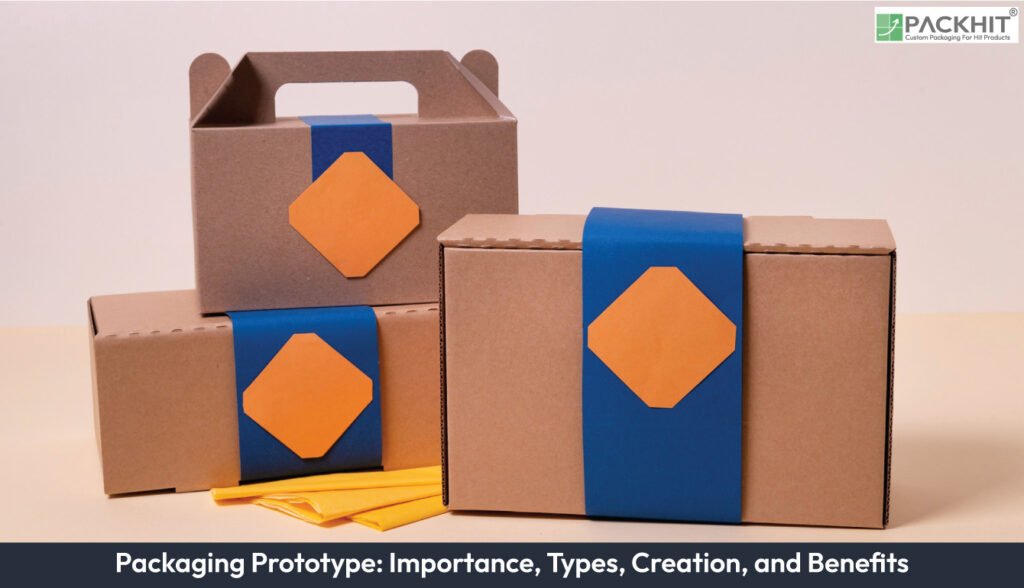
A packaging prototype is a physical or digital replica that reproduces geometry, substrate, finishing and printed artwork closely enough to verify fit, protection, manufacturability and retail presence. Prototypes cluster into visual proofs, structural mock-ups and production-faithful pilot tools, each addressing different fidelity requirements: graphic fidelity, dimensional accuracy and machine-run behaviour. Building a prototype follows a defined sequence specification, structural CAD, material selection, sample manufacture, print/finish and multi-modal testing and returns measurable outcomes in reduced tooling rework, faster approval cycles and improved first-run yield.
- What is a Packaging Prototype?
- Why are Packaging Prototypes Important?
- What are the Different Types of Packaging Prototypes?
- Digital proofs and 3D renders
- Structural Mock-ups (paperboard and 3D-printed)
- Printed and finished samples
- Pilot tooling or prototype unit tool
- Carton and corrugated prototypes
- Flexible packaging prototypes
- How to Create a Packaging Prototype?
- 1. Define specification data
- 2. Build structural CAD
- 3. Select material groups
- 4. Produce the preliminary model
- 5. Test structural and print accuracy
- 6. Revise and resample
- How can Packaging Prototypes be Tested?
- What is the ideal iteration rhythm for prototype package design?
- Where to Obtain Prototypes and How to Choose a Supplier?
- Roles Required in Prototype Development
- What are the Benefits of Packaging Prototypes?
- Financial gains from early verification
- Operational gains during approval and production
- Commercial gains through verified shelf and user performance
- How to avoid Packaging Prototype Errors?
- What checklist confirms that a specification is ready for prototype package design?
What is a Packaging Prototype?
A packaging prototype is a test artefact that copies the planned form and function of a pack to confirm design choices before production. A prototype package model in early design shows how artwork sits on a surface and how a structure behaves. A prototype can be digital, with raster or vector images that present artwork and structural simulation, or physical, from a hand‑cut paper sample to a short‑run pilot tool that runs on production lines. Core tasks cover dimensional checks such as fit and closure, protection checks such as impact, compression and seal strength, and market checks such as colour, finish and shelf position.
Why are Packaging Prototypes Important?
Packaging prototypes reduce design risk and confirm production‑ready details. A prototype functions as a controlled test article that exposes geometry faults, material interactions and artwork distortions before a manufacturer commits to tooling. Prototype package design uses a preliminary model that recreates structure, print intent and closure behaviour closely enough to reveal faults that remain hidden in CAD or artwork files.
Physical or digital models capture three verification areas. Dimensional checks confirm fit around product components, barcode windows and regulatory panels, if the final artwork is already placed. Material checks show crease density, film stretch and board stiffness under repeated handling. User‑side checks reveal opening force, grip points and alignment of critical artwork zones such as front panels and nutrition blocks.
Manufacturers in the UK rely on prototypes to expose early risk in four places: interference between product and pack, board or film selection errors, colour shift across substrates and assembly sequence conflicts. Tests on a preliminary model detect print drift across folds, spout misalignment in flexible formats and closure fatigue after multiple cycles. Findings from this stage prevent downstream rework because acceptance criteria connect directly to the prototype unit and give quantifiable limits such as ±0.5 mm trim deviation or minimum seal strength, where applicable.
What are the Different Types of Packaging Prototypes?
Types of Packaging prototypes include digital proofs, structural mock-ups, printed samples and pilot tooling, each built as a preliminary model that tests artwork placement, structural behaviour and material response before final production.
Digital proofs and 3D renders
Digital proofs are non-physical samples used to check artwork, dielines and simulated three-dimensional appearance. They validate colour separations, trim safety and typography before ink-to-substrate tests. Use digital proofs when rapid artwork iterations or remote approvals are required.
Structural Mock-ups (paperboard and 3D-printed)
Structural mock-ups copy folds, glues and internal supports to check dimensional fit and the assembly sequence. Typical materials include paperboard, corrugated fibreboard and 3D-printed polymers, with paper samples used as early models. Use them to confirm component fit, closure function and consumer handling, if the aim is geometric verification rather than final print fidelity.
Printed and finished samples
Printed samples combine substrate, inks and finishing to validate graphic registration, varnish, lamination and tactile effects. They are essential for shelf-facing assessments and to confirm prepress-to-press colour matching. Expect higher costs and longer lead times than simple mock-ups.
Pilot tooling or prototype unit tool
Pilot tooling is short-run tooling built to approximate production tools for process validation. It confirms the die geometry, cutting and creasing behaviour and machine setups under near-production conditions. Use it when final tooling or a production trial is planned and when machine-run behaviour must be validated.
Carton and corrugated prototypes
Carton prototypes are folding-carton mock-ups that verify glue panels, lock tabs and print registration. Corrugated prototypes test stacking, palletisation and edge crush resistance for transit packaging. Select carton tests for retail presentation and corrugated tests for logistics and freight protection.
Flexible packaging prototypes
Flexible prototypes are laminated films or mono-material film packs that validate seal integrity, barrier performance and dispensing features. They address material behaviours such as heat-seal window, cold crack and oxygen permeation. Use flexible prototypes when barrier or sealing performance is critical to shelf-life or safety.
How to Create a Packaging Prototype?
To make a packaging prototype, capture specification data, build structural CAD, select substrate groups, produce a preliminary model and run dimensional, material and print tests before revising drawings and resampling until geometry, artwork placement, and material behaviour meet defined limits.
1. Define specification data
Record product weight, external dimensions and fill tolerances, then list each distribution step, such as warehouse storage or parcel networks. Add mandatory regulatory panels, for example, net weight, batch codes or recycling marks, because these influence panel allocation on the preliminary model.
2. Build structural CAD
Draw dielines, crease lines and cut paths that match fold behaviour and load points. Simulate hinge motion, closure travel, and fit around contact-sensitive components. Prototype package design depends on this stage because CAD defines the geometry that later sample cutters reproduce.
3. Select material groups
Choose substrate grades, film constructions or tray polymers that match functional intent. Examples include the SBS board for cartons or PET/PE laminate for pouches. Material groups set stiffness, barrier range and print response, which the preliminary model tests at low volume.
4. Produce the preliminary model
Cut paperboard samples, print short digital sheets or 3D‑print inserts. Early-stage layouts check geometry; later runs check registration, panel alignment and crease stability. This step converts the CAD layout into a physical or digital prototype that exposes faults hidden in drawings.
5. Test structural and print accuracy
Measure dimensional deviation around lids, tabs or seals and record colour drift across folds. Examples include trim tolerance checks or seal‑strength readings. These checks confirm that the preliminary model aligns with acceptance ranges defined during specification.
6. Revise and resample
Update CAD, artwork panels or material grades when failure modes appear. Produce a corrected preliminary model if load behaviour, crease stability or print targets fall outside limits. Revisions tighten geometry and print intent so that subsequent prototypes trend toward production‑ready fidelity.
How can Packaging Prototypes be Tested?
Packaging prototypes are tested through mechanical, environmental, barrier and user‑centred checks that show how a preliminary model behaves under transport, storage and handling conditions. A prototype package design includes a preliminary model that exposes weak points early, if drop impact, vibration or humidity changes cause failure. Tests fall into discrete groups that reflect real distribution steps and product loads.
- Mechanical tests measure impact and movement using drop trials or vibration tables, with examples such as single‑drop checks or programmed vibration profiles.
- Compression tests record pallet‑load response using stack or top‑to‑bottom pressure checks, with examples such as short‑term stack trials.
- Seal tests confirm seal‑strength margins on pouches or sachets using tensile or burst checks, with examples such as peel‑force readings.
- Barrier tests quantify oxygen or moisture transfer using OTR or WVTR checks, with examples such as cc/m²·day oxygen readings.
- Environmental tests expose the preliminary model to heat and humidity cycles, with examples such as 0–40°C shifts or 85 percent humidity exposure.
- User tests observe opening force and handling, with examples such as ease‑of‑open trials or reseal checks.
What is the ideal iteration rhythm for prototype package design?
Adopt short iteration cycles for early-stage decisions and longer cycles for production fidelity; this staging reduces total iterations and concentrates expensive runs on near-final designs. Paper mock-ups appear within 24–72 hours for geometric checks; printed and laminated samples take 5–14 days for colour and registration checks; pilot tooling runs take multiple weeks for machine-set verification. Prototype package design relies on these staggered timings because a preliminary model exposes faults before tooling purchase. Plan three to five sample iterations for most consumer‑packaged goods projects to reach stable tool‑ready specifications.
Where to Obtain Prototypes and How to Choose a Supplier?
Obtain prototypes from specialist prototyping houses, commercial printers with sample departments or in-house facilities when volume and confidentiality permit. Choose suppliers that demonstrate the necessary technical capabilities and transparency.
- Technical capability: in-house CAD/dieline support and sample cutting (examples: CNC cutter, digital press).
- Materials library: a range of boards, films and coatings to approximate final materials (examples: SBS board, kraft corrugated, PET/PE laminates).
- Testing facilities: ability to perform mechanical and barrier tests or access to accredited labs (examples: drop test rig, OTR analyser).
- Communication and IP handling: clear version control and confidentiality processes (examples: NDA, controlled artwork repositories).
- Turnaround and cost transparency: published lead times and itemised sample quotations (examples: per-sample pricing, tooling amortisation).
Roles Required in Prototype Development
Prototype development requires a multidisciplinary team to translate product requirements into validated packaging. Key roles and responsibilities are distinct and complementary.
- Structural designer: creates dielines and folding logic and simulates load-bearing and nest fit (examples: 2D dieline, 3D CAD assembly).
- Graphic designer/prepress: prepares artwork, sets trim and bleed, and generates print-ready files (examples: colour separations, varnish masks).
- Materials technologist: specifies substrates and laminate constructions and selects adhesives and coatings (examples: barrier films, glue types).
- Print technologist: selects press processes and calibrates colour profiles for fidelity (examples: digital press settings, ink densities).
- Test engineer: defines test plan, executes mechanical and environmental tests and interprets failure modes (examples: compression testing, seal-strength analysis).
- Toolmaker/supplier liaison: produces dies and tooling and coordinates pilot-run setups (examples: hardened-rule die, CNC tool cutting).
- Project manager: coordinates timelines, budgets and stakeholder approvals (examples: sample schedule, approval checkpoints).
What are the Benefits of Packaging Prototypes?
Packaging prototypes give measurable financial, operational and commercial gains. A preliminary model exposes faults early, so manufacturers reduce late-stage changes and confirm design intent before tooling.
Financial gains from early verification
Financial gains arise because prototype package design reveals geometry faults, print drift or material mismatch before tooling. This early step cuts retooling spend and cuts wasted plate time if print alignment falls outside tolerance. Savings increase when a preliminary model confirms crease stability or seal behaviour, because the design team commits to tooling only after defects are removed.
Operational gains during approval and production
Operational gains appear when a prototype reduces approval loops and trims process adjustments. Dimensional and print checks on a preliminary model highlight deviations in trim, fold position or colour density. Line operators record fewer press corrections and generate lower first-run scrap if artwork registration and crease logic match production behaviour. The shorter approval sequence increases scheduling reliability across press, finishing and packing lines.
Commercial gains through verified shelf and user performance
Commercial gains follow from accurate visual proofs and structural mock-ups that reflect retail presence. Manufacturers confirm colour consistency, panel hierarchy and opening force before the launch. This reduces consumer returns due to seal faults or crushed corners if the pack fails under handling. Retail teams report clearer shelf blocks and steadier conversion when colour and structure match the intended design.
How to avoid Packaging Prototype Errors?
Prevent packaging prototype errors by matching the preliminary model to the intended production process and by setting measurable acceptance limits that expose colour drift, seal faults or structural weakness early.
- Colour mismatch: avoid colour variance by using measured profiles and substrate‑specific proofs, if artwork moves between coated and uncoated boards.
- Inadequate sealing margins: prevent seal failure by testing seal strength across controlled temperature ranges, if process variation affects pressure or seal width.
- Structural failures in distribution: reduce transit faults by running compression and vibration tests at representative pallet loads, if sample weight or stack height changes.
- Overfidelity too early: reduce waste by keeping early models simple and low cost, if the design team has not confirmed structural and artwork freeze.
At Which Stage of Product Development Should Prototypes be Introduced?
Introduce prototypes after final artwork and structural sign-off but before purchase of final production tooling. Early-stage mock-ups support concept validation; production-faithful prototypes should be completed prior to production sign-off to avoid costly changes after tooling purchase.
What checklist confirms that a specification is ready for prototype package design?
A specification is ready when core product data, distribution steps, material targets, print intent and measurable acceptance limits appear in one verified record that guides the preliminary model in prototype package design.
- Product data: record net weight, physical dimensions, and fill tolerances with short entries such as nominal fill or headspace. These values guide the preliminary model in prototype package design.
- Distribution profile: list transport mode and pallet layouts with examples such as sea freight or mixed-sku pallets. These steps define load paths for the preliminary model.
- Material targets: specify substrate grade, coatings and barrier limits with entries such as recyclable board or metallised laminate. These details set stiffness and barrier baselines for the prototype.
- Print targets: note colour references and finishing points with examples such as Pantone IDs or varnish areas. These items fix artwork intent before sample cuts.
- Acceptance criteria: set mechanical, environmental and regulatory pass or fail limits with examples such as seal strength greater than X N or dimensional tolerance of ±Y mm. These limits define pass bands for the preliminary model.