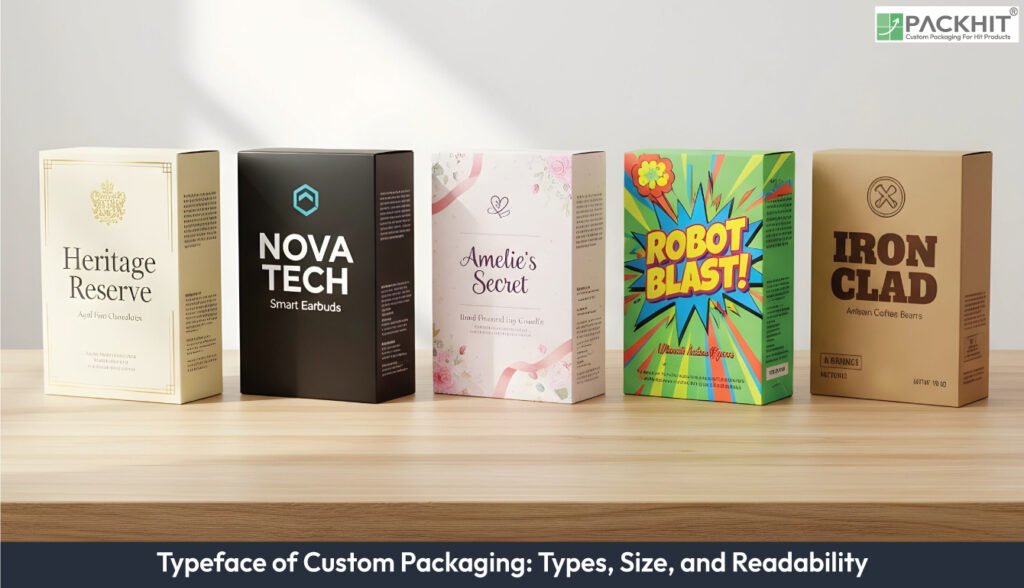
Typography in packaging design is the art and technique of using text to attract attention, convey information, support brand identity, and improve usability. Designers select typefaces, sizes, and spacing to balance readability, hierarchy, and brand personality while accounting for printing methods, materials, and finishes. Different type categories, such as serif, sans‑serif, slab serif, script, display, and monospaced, serve distinct roles, from heritage branding to technical labelling. Proper font sizing, spacing, and contrast preserve clarity across substrates and processes, while typographic specifications guide consistent production. The common errors include poor font pairing, low contrast, or misalignment, and testing fonts in real production conditions. Designers must avoid these issues to ensure typography communicates effectively, supports the brand identity, and enhances shelf impact.
- What is Typography in Packaging Design?
- What are the Types of Typefaces for Packaging?
- Serif Typeface
- Sans‑Serif Text
- Slab Serif Text
- Script and Hand‑lettered Text
- Display Text
- Monospaced Text
- What Font Sizes Work Best for Readability on Packaging?
- Display Size (18–24 pt and above)
- Primary Descriptor Size (10–16 pt)
- Secondary Copy Size (7–10 pt)
- Regulatory and Legal Size (6–7 pt minimum)
- What Typographic Factors Influence Readability?
- Character Shape Clarity
- Line and Letter Spacing
- Contrast Between Ink and Substrate
- Font Size Consistency
- Print and Material Interaction
- Letterform Style and Category
- How Do Printing Method, Material, and Finishing Affect Typeface Choice?
- How to Write a Typographic Specification for a Packaging Brief?
- What are the Common Typographical Errors on Packaging?
- How to Ensure the Smooth Typography on Packaging?
- How To Choose the Best Typefaces for Packaging?
What is Typography in Packaging Design?
Typography in packaging design refers to the strategic use of type, such as fonts, letterforms, spacing, hierarchy, and layout, on product packaging to communicate information, build brand identity, and influence customer perception. The main functions of typography in packaging design are as follows:
- Typography shapes text to build clear visual order across brand names, descriptors, and legal lines.
- Typography controls letterform traits that affect fast recognition under store lighting.
- Typography defines spacing rules that keep characters intact after print processes such as flexography or digital transfer.
Typography is important for packaging design because it supports on-pack communication by guiding how brand names, variant labels, ingredient lists, and compliance text appear on the substrate. Typography keeps information organised, reduces reading errors at small sizes, and stabilises recognition across print runs.
What are the Types of Typefaces for Packaging?
The types of typefaces (fonts) for packaging are as follows:
- Serif
- Sans‑serif
- Slab serif
- Script and hand‑lettered
- Display or decorative
- Monospaced
Serif Typeface
Serif text uses stroke contrast and terminal details that create formal cues on packaging. Serif fonts read cleanly at mid‑to‑large sizes and lose hairlines if printed with flexography or on uncoated stock. Serif families fit heritage, luxury, or origin‑driven products.
Sans‑Serif Text
Sans‑serif text uses low contrast, open shapes, and simplified terminals that hold form at small sizes. Sans‑serif fonts print well on low‑resolution methods and support mass‑market, technical, or minimalist goods where small‑copy clarity matters.
Slab Serif Text
Slab serif text uses thick rectangular serifs that maintain mass on textured boards. Slab serif fonts keep counters open and resist ink spread, which helps headlines and short descriptors printed on kraft, recycled, or embossed panels.
Script and Hand‑lettered Text
Script and hand-lettered text use connected strokes and variable widths that work only at the display scale. Script fonts collapse at small sizes on packaging, so designers use them for brand marks, variant accents, or limited decorative panels.
Display Text
Display text uses custom shapes or exaggerated geometry that attract attention in large zones. Display fonts collapse in small copy and lose recognizability under store lighting, so they appear on primary panels, not ingredient or legal sections.
Monospaced Text
Monospaced text uses equal character widths that support aligned data. Monospaced fonts assist technical labels, dosage fields, calibration markings, or SKU‑dense packaging where tabular consistency prevents misreading.
What Font Sizes Work Best for Readability on Packaging?
The font sizes that work best for readability on packaging are given below:
Display Size (18–24 pt and above)
Display size supports fast recognition at shelf distance because larger shapes maintain clarity under varied lighting. This range stabilises word shape and prevents washout on coated and uncoated boards. Packaging mockups confirm if oversized characters retain proportion after trimming and folding.
Primary Descriptor Size (10–16 pt)
Primary descriptors identify product type and variant. This range balances compact layout zones with legibility across flexography, digital, and litho. Larger x-height families in this band keep internal counters open if the substrate has texture.
Secondary Copy Size (7–10 pt)
Secondary copy provides short claims and brief instructions. This band holds form on most substrates, although ink-heavy processes may require a 1 pt increase. Readers track short lines faster if spacing remains wider than the default.
Regulatory and Legal Size (6–7 pt minimum)
Regulatory text reaches the lower boundary of reliable legibility. Coated stock with high-contrast ink preserves thin strokes, while uncoated stock often adds dot gain that obscures small characters. A pilot proof verifies if the final minimum survives production variables.
What Typographic Factors Influence Readability?
The typographic factors that influence readability include:
Character Shape Clarity
Character shape clarity depends on how well the letterform preserves its internal counters and stroke widths after printing. Character edges retain form when stroke contrast does not collapse on textured stock. Character recognizability improves when the x‑height remains large enough for fast scanning at shelf distance.
Line and Letter Spacing
Line and letter spacing govern text density across short and long copy blocks. Line spacing reduces collision risk between ascenders and descenders when print gain increases. Letter spacing improves word grouping when packaging includes compact panels or long regulatory text.
Contrast Between Ink and Substrate
Contrast between ink and substrate controls the luminance difference that enables quick reading in store lighting. Contrast weakens when gloss coatings reflect directional light. Contrast improves when designers choose darker inks on light stock or lighter inks on dark panels.
Font Size Consistency
Font size consistency affects readability across brand names, descriptors, and legal lines. Font size holds shape at or above each process’s reliable minimum. Font size shifts slightly upward when uncoated substrates introduce dot gain that softens fine strokes.
Print and Material Interaction
Print and material interaction alters how letterforms appear across flexography, digital, and litho processes. Print gain increases stroke thickness on absorbent substrates. Print surfaces with gloss coatings add glare that obscures thin characters under store LEDs.
Letterform Style and Category
Letterform style and category influence how readers parse text in different product contexts. Letterform categories like serif, sans‑serif, and script shape user expectations based on packaging norms. Letterform construction also changes how characters survive folding, trimming, and high‑speed press conditions.
How Do Printing Method, Material, and Finishing Affect Typeface Choice?
Printing method, material, and finishing directly influence how the typeface appears. Different printing techniques (like digital, offset, or flexography) handle fine details differently, meaning thin or delicate fonts may blur, fill in, or lose definition depending on the process. The material, such as paper, plastic, metal, or textured surfaces, can also affect clarity, as rough or absorbent substrates may spread ink and reduce sharpness. Finishing touches such as embossing, foil stamping, or varnishing require fonts with enough weight and simplicity to hold their shape and maintain legibility after the process.
How to Write a Typographic Specification for a Packaging Brief?
To write a typographic specification for a packaging brief, consider the following steps:
- Typeface: List the type family, manufacturer, and exact font files to be used. Include all licensed weights (e.g., Regular, Bold, Semi-Bold) and specify fallback fonts for system or regional compatibility.
- Colour: Define colour values using Pantone, CMYK, or both. Specify whether the text should overprint or knock out, especially for fine text or metallic/varnish layers.
- Sizes: Provide a point-size chart for each text category (brand name, product descriptor, body copy, legal text) and note the minimum readable size for every substrate (e.g., paperboard vs. flexible film).
- Spacing: Establish tracking (letter-spacing), line height (leading), and paragraph spacing. Identify any custom kerning rules, especially for logotypes or headline typography.
- Grid and Placement: Define the baseline grid, panel-by-panel text mapping, safe zones, bleeds, folds, and areas restricted due to tooling or die-cut interruptions.
- File Deliverables: Specify the required files, such as press-ready PDF with outlined text, native design files with embedded fonts, colour-separated proofs, and a physical or digital press-check sample for verification.
What are the Common Typographical Errors on Packaging?
The common typographical errors on packaging include:
- Using too many fonts makes the packaging look cluttered.
- Pairing fonts poorly so they clash or feel inconsistent.
- Printing text too small, making ingredients or instructions hard to read.
- Using low-contrast colours so text blends into the background.
- Having tight or loose spacing that hurts readability.
- Overusing all caps, especially in longer sentences.
- Poor kerning that makes brand names look awkward.
- Long line lengths that stretch across panels and reduce clarity.
- Misaligned text blocks make the layout feel unprofessional.
How to Ensure the Smooth Typography on Packaging?
To ensure smooth typography on packaging, use a clear and consistent font system that highlights hierarchy while staying readable at various sizes. Maintain proper spacing, alignment, and contrast so text remains legible both up close and on shelves. Choose fonts that print well and avoid distortion, checking how they appear in real production conditions. Finally, test the design with prototypes to verify readability, clarity, and overall visual balance.
How To Choose the Best Typefaces for Packaging?
To choose the best Typefaces for packaging, consider the following aspects:
- Legibility: Ensure the font is easy to read at typical viewing distances and on the chosen package size.
- Brand Alignment: Select fonts that reflect the brand personality (e.g., serif for tradition, sans-serif for modernity).
- Hierarchy: Use different weights, sizes, or styles to distinguish product names, descriptors, and regulatory information.
- Testing: Preview fonts on actual packaging mockups to check clarity under various lighting, printing methods, and substrate textures.
- Emotional Impact: Consider how the font conveys the desired mood or perception to consumers.
- Consistency: Maintain consistent font choices across packaging lines to reinforce brand identity.
What are the Emerging Typography Trends in Packaging?
Emerging typography trends in packaging include bold, expressive type and minimalist, clean sans-serifs that help products stand out and feel modern. Designers are also embracing vintage-inspired fonts to evoke nostalgia, along with playful or maximalist styles for youthful appeal. Typography is increasingly aligned with sustainable materials and used as a core element of brand identity rather than just functional text.
How Small Can Legal Copy Be on Packaging?
Legal copy on packaging can be as small as the smallest size that remains legible on the chosen substrate and process. Many designers set 6–7 pt as a conditional lower bound for coated stocks printed with stable processes and increase that bound for uncoated or textured stocks.
Is All‑Caps Better for Short Headlines On‑Pack?
No, all‑caps rarely improves short on‑pack headlines because compressed letterforms reduce distinct word shapes, and readers scan mixed‑case text faster. All‑caps holds value only in two cases when packaging requires strong geometric alignment or when the headline uses 1–2 words with wide tracking.