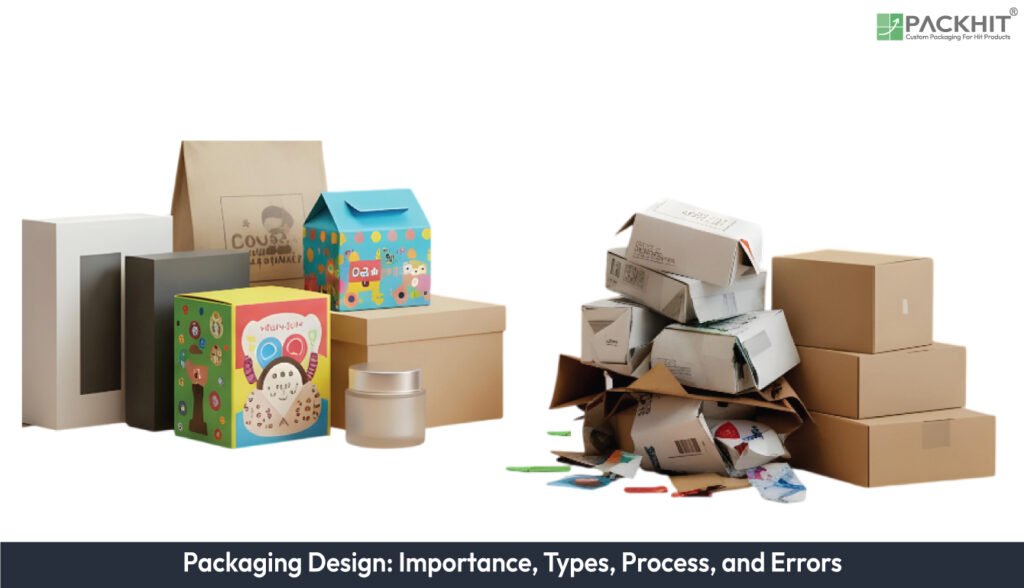
Packaging design shapes how a product is identified, protected, and transported across retail and e-commerce channels. Packaging design defines the structure and graphics that hold, protect, and present the product. Packaging design also explains why visibility, protection, and brand recognition influence buyer decisions. The main types of packaging design include structural, graphic, industrial, transit-first, and sustainability-focused formats used across the UK. Packaging design is created through a ten-step process that covers requirements, structure development, graphics, testing, and production files. Common errors in packaging design include weak structural panels, crowded artwork, and untested prototypes. Effective packaging design relies on dimensional control, prototype testing, and transit checks to ensure a smooth flow from factory to retail.
- What is Packaging Design?
- Why is Packaging Design Important?
- What are the Types of Packaging Design?
- Structural Packaging Design
- Graphic Packaging Design
- Production and Industrial Packaging Design
- Minimalist Packaging Design
- Luxury Packaging Design
- E‑commerce and Transit‑first Packaging Design
- Sustainability‑focused Packaging Design
- How to Create Packaging Design?
- What are the Different Types of Packaging Design Software?
- What are Some Common Errors in the Packaging Design?
- How to Ensure Smooth Packaging Design?
- What are the Emerging Trends in Packaging Design?
- How Much Does Packaging Design Cost?
- How is Packaging Designed for Shipping?
What is Packaging Design?
Packaging design defines the physical structure and visual system that holds, protects and identifies a product. It uses fixed specifications for geometry, substrate and print layout to match mechanical loads and legal labelling. Packaging design links structural panels, graphic hierarchy and production limits, and it sets constraints for transport, storage and shelf handling. A common example appears in a consumer snack pouch, where the gusset shape, film thickness, colour blocks and regulatory panels follow fixed print and load rules to pass filling-line checks and retail display requirements.
Why is Packaging Design Important?
Packaging design is important because it signals product identity at a glance and gives buyers rapid cues about function, quality and compliance. It protects the item during transit through defined structural and material choices. Packaging design also supports brand recall in retail environments where similar products compete for attention. Brands in crowded categories gain added recognition when packaging repeats consistent visual elements across ranges. Research from market audits cited in product-packaging guides shows that clear structure and colour blocks raise shelf pick‑up rates across fast‑moving consumer goods.
What are the Types of Packaging Design?
The types of packaging design are grouped into structural, graphic, production-focused, e-commerce, and sustainability-focused formats that define how a package holds, identifies, and moves a product through supply chains. Each type of packaging design is listed below:
- Structural Packaging Design
- Graphic Packaging Design
- Production and Industrial Packaging Design
- Minimalist Packaging Design
- Luxury Packaging Design
- E-Commerce and Transit First Packaging Design
- Sustainability-Focused Packaging Design
Structural Packaging Design
Structural packaging design defines geometry, load paths and closure systems for cartons, corrugated boxes, bottles and pouches. Structural design sets fixed panel sizes, score depths, fold radii and glue‑tab dimensions; these elements control stack strength, impact resistance and machine fit during filling.
Graphic Packaging Design
Graphic packaging design sets visual hierarchy, colour specification and regulatory placement on the dieline. Graphic design uses controlled colour blocks, font outlines, and production‑ready assets to keep legibility on the shelf and to keep ink density within press limits cited in packaging guidance sources such as trade manuals and buyer guides.
Production and Industrial Packaging Design
Production and industrial packaging design match the package form and stiffness to the converting, filling and sealing equipment. Production and industrial design sets feed orientation, closure torque windows, adhesive type and thermal limits that prevent jams or seal defects on automated lines.
Minimalist Packaging Design
Minimalist packaging design reduces visual density, material mass and component count across packs. Minimalist design uses restrained colour palettes, simplified icon sets and single‑panel text groups to shorten pre‑press checks and raise shelf clarity, if categories contain dense visual competitors. Minimalist design also trims substrate thickness, removes redundant inserts and aligns with guidance from packaging‑design handbooks, which highlight consumer preference for concise layouts across fast‑moving retail goods.
Luxury Packaging Design
Luxury packaging design focuses on premium materials, precise construction, and refined visual restraint to signal high value and exclusivity. It typically uses rigid boards, reinforced structures, and high-quality finishes such as embossing, foil stamping, soft-touch laminates, or textured papers, combined with minimal typography and controlled colour palettes. Luxury packaging design enhances the tactile and unboxing experience through engineered closures and fitted inserts, while maintaining product protection.
E‑commerce and Transit‑first Packaging Design
E‑commerce and transit‑first packaging design uses ship‑ready structures that limit damage in single‑item shipping. E‑commerce and transit‑first design applies right‑sizing, tamper indicators and protective inserts to reduce void space and keep address labels visible in courier handling.
Sustainability‑focused Packaging Design
Sustainability‑focused packaging design defines recyclability, recycled‑content levels and end‑of‑life behaviour. Sustainability‑focused design prefers mono‑material boards or films, sets weight‑reduction targets and aligns with recycling‑stream rules referenced in UK waste‑classification guidance.
How to Create Packaging Design?
To create a packaging design, follow the 11‑step process below:
- Briefing: define objectives, target markets with examples, regulatory rules, and cost boundaries that set acceptance criteria.
- Initial market research: map competitors across price tiers, pack formats and material use to extract measurable traits.
- Strategic positioning: set visibility targets, sustainability thresholds and cost‑per‑unit limits that rank design paths.
- Concept generation: create 3–5 artwork directions and 1–2 dieline variants that convert positioning criteria into early layouts.
- Feasibility review: check manufacturability through material assessments, conversion methods and print constraints that remove unworkable concepts.
- Structural design (dieline preparation): define vector cut paths, crease paths and glue zones that fix panel sizes and fold order.
- Artwork development: build layered graphics with colour files, typography sets and regulatory marks aligned to the dieline.
- Prototype production: create short‑run prints and 3D visuals that reveal fit issues if tight folds or glue seams appear.
- Validation testing: review consumer panels, A/B comparisons and technical checks that confirm acceptance criteria.
- Iteration toward approval: revise copy, adjust dieline tolerances and correct colour files where tests show confusion or poor fit.
- Final handover and pre-production: assemble print‑ready artwork, final dielines and material specifications for supplier sign‑off.
What are the Different Types of Packaging Design Software?
The different types of packaging design software include:
- ArtiosCAD: Structural packaging CAD software used to create dielines, folding cartons, and corrugated box structures with load and material control.
- Esko Studio: 3D packaging visualisation software used to render artwork on structural files for virtual shelf and transit review.
- ArtPro+: Prepress packaging software used to prepare, inspect, and correct print‑ready files for labels, cartons, and flexible packs.
- Adobe Illustrator: Vector design software used to build packaging artwork, colour layers, and regulatory panels on approved dielines.
- Packmage Designer: Corrugated packaging software used to design shipping boxes, calculate board grades, and simulate stacking strength.
- Impact: Structural packaging design software used for parametric carton design, prototyping, and cost estimation.
- SolidWorks: Mechanical CAD software used to model rigid packaging parts, closures, and component fit with manufacturing tolerances.
- Blender: 3D modelling software used to create visual packaging mock‑ups and animation previews for concept validation.
- KeyShot: Rendering software used to generate photorealistic packaging visuals from CAD or artwork files for presentation review.
What are Some Common Errors in the Packaging Design?
Some common errors in the packaging design are as follows:
- Weak panel structure: Under‑specified board grades or score depths that collapse during pallet moves.
- Overloaded artwork: Dense colour blocks or small text that loses legibility on fast‑moving consumer goods.
- Incorrect regulatory placement: Missing ingredients, safety icons or origin statements on food or cosmetic packs.
- Inconsistent dieline use: Artwork that drifts outside safe areas after converting or glueing.
- Unverified prototypes: Absence of appearance or functional samples before tooling or die‑cut setup.
- Transit gaps: No drop, compression or vibration tests for single‑parcel shipping through UK couriers.
- Ink density overshoot: Total‑ink coverage above press limits documented in converter guides.
- Poor label orientation: Barcodes or address zones are placed where scanners struggle during distribution.
- Void‑space waste: Structural designs that leave excessive empty volume in e‑commerce packs.
How to Ensure Smooth Packaging Design?
To ensure smooth packaging design, set clear technical requirements that fix dimensions, distribution conditions and labelling zones from the start. Cross‑check structural limits with converter data so board grade, film gauge and closure strength match filling‑line conditions. Align artwork with the dieline and confirm colour density against press sheets from previous production runs cited in packaging guides. Test appearance and functional prototypes under drop, compression and vibration loads used in UK courier audits. Confirm transit fit, pallet stability and scanner visibility so the packaging design moves through retail and e‑commerce handling without conflict.
What are the Emerging Trends in Packaging Design?
The emerging trends in packaging design include Bold Typography, Monochrome Brand Palettes, Recyclable Fibre Materials, Refill‑ready Formats, Minimal Ink Graphic Layouts, Interactive QR Layers, Resealable Function Closures, Moisture‑Control Inserts and Transparent Windows. These trends push brands toward clearer visual hierarchy and lower‑mass formats that fit recycled fibre streams cited in packaging guides. Interactive QR layers support rapid product checks if buyers want sourcing or safety details at the point of sale. Transparent windows and moisture‑control inserts stabilise freshness in UK retail channels that handle frequent humidity shifts.
How Much Does Packaging Design Cost?
The packaging design cost ranges from £250 to hundreds of pounds in the UK, depending on structural complexity, artwork density and prototype count. Simple carton layouts sit at the lower end, while multi‑panel ranges require higher fees. Costs rise fast if brands request appearance and functional prototypes for transit‑heavy e‑commerce goods.
How is Packaging Designed for Shipping?
Packaging is designed for shipping by fixing structural strength, cushioning zones and closure integrity so the pack resists drop, compression and vibration loads. Designers set board grade, film gauge and panel geometry to keep the product stable during pallet moves. Transit engineering also aligns label placement and outer dimensions with courier scanning rules cited in packaging‑logistics guides. These controls lower damage rates across UK distribution networks.